Press E and move the mouse: exposure follows. C drives contrast, T temperature and tint together. A click confirms. No hunting for sliders, no aiming at tiny handles: your eyes stay on the photo.
Select photos in the Grid and use the very same keys as in Develop: E for more light, C for more punch. Every selected photo gets the change, live, right there in the thumbnails.
Too dark, too bright, the wrong white balance: select them and pick AutoEdit from the pie menu. It learns your style, so the starting point gets closer to your own edit, and you make the final call.
Space pops the photo up large, with its rating and shot info, and the arrow keys flip through the shoot. Rate with 1 to 5, reject with X, and filter the Grid down to the keepers.
Ctrl+C asks which groups of settings to copy; paste them onto the rest of the series. Or save the look as a preset and apply it to the whole album with a double click.
A bright, punchy color edit, a black and white one, a tight crop: the Edits button makes another edit of the same photo, as many as you like, and Shift+1, Shift+2, … open them. Tick In grid and an edit becomes a photo of its own in the Grid, next to its siblings.
A linear gradient darkens a bright sky; a radial one brings a backlit face out of the shadow. Each takes the same keys as the whole photo: E for exposure, C for contrast, T for white balance.
Press I and a square follows the pointer, saying which temperature and tint a click there would give. Hold Shift to see it on the photo as you move; click a white shirt or a grey wall, and the light is right, whatever it was before.
Press R and the mouse rotates the photo over a rule-of-thirds grid; a click confirms. C, G and S switch to perspective, move and crop-in in the same go.
The scopes follow every change in real time: the histogram slides with the exposure, the vectorscope swings with the white balance and the hue curves, so you judge color and clipping while you edit.
Dark, light or very dark, and the Darkroom theme: switched live. More →
Under the hood
Built for speed. Built to be trusted.
Hand-optimized pipelines, on whatever you have
The image processing is written in Halide and tuned by hand, on the CPU and on the GPU. SilverNode picks the fastest compute it finds on your machine, and on the CPU it uses the widest vector instructions your processor has. No hardware upgrade required.
SilverNode only reads them. Every edit goes to a small JSON sidecar next to the photo, saved the moment anything changes, presets included, so the look travels with the file.
Background workers decode and prepare while you edit, the photos before and after the one you're on are kept ready on the GPU, and exports queue up without stopping you.
It looks for faces, people and neutral tones, and combines what each of those says by how sure it is. The Edit Quality dial tells you how confident the result is.
Clicking the video takes you to YouTube, where Google's privacy policy applies.
Camera Support
Your camera is most likely supported.
SilverNode relies on LibRaw and RawSpeed to decode RAW files. Most cameras these libraries support will work, but not all! SilverNode additionally requires your camera to have square pixels and 3 color channels with the RGB color model.
darktable uses the same decoders, so its camera support list gives a good first indication.
Many more things have been done, and many more are coming. For more details, check out the CHANGELOG. To stay tuned, subscribe to the newsletter, join Discord, or check out the social media platforms below.
Download
Try the free beta today!
SilverNode is still in development, but is already a usable product. This version is currently still available for free. If you wish to support the product and my work, you can already buy a license in your name and activate it in SilverNode.
Intel / AMD, ARM or Apple Silicon: which one do I need?
Windows
Almost every PC needs Intel / AMD. Only laptops with a Snapdragon chip (such as the "Copilot+ PCs") need ARM. To check: Settings → System → About, then look at System type: "x64-based" is Intel / AMD, "ARM-based" is ARM.
macOS
Most Macs from late 2020 onwards have Apple Silicon (an M1, M2, M3, … chip); older ones have an Intel processor. To check: Apple menu → About This Mac, then look at Chip or Processor.
Linux
Pick Intel / AMD, unless it runs on an ARM board or laptop, such as a Raspberry Pi. To check: uname -m says x86_64 for Intel / AMD, aarch64 for ARM.
Picked the wrong one? Apple Silicon Macs and ARM PCs can still run the Intel / AMD version, only slower. The other way around does not work.
New to SilverNode? The quick start takes you from opening a folder to your first export.
Vision
Martijn
The sole developer
Photo editing software today is painfully inefficient for photographers who take hundreds or thousands of pictures at an event. Many hours are lost sitting behind a computer editing the albums we shoot. Personally, I would like to take more pictures and edit less.
SilverNode will take away the frustration and give you back the freedom to shoot photos without worrying about editing them.
I want SilverNode to …
be an extremely fast photo editor on every computer.
have an elegant workflow.
predict your desired edit settings by learning your style.
produce high-quality photos.
be intuitive, yet powerful.
reduce your editing time by 80% or more.
I hope you enjoy SilverNode.
This project started in 2016 as a proof of concept during my university years. SilverNode has been in full-time development since January 2024!
Pricing
Pay once, own it forever.
I respect your freedom and your money. SilverNode is available for a one-time purchase, after which you own it forever.
The software is sold by a reseller, Sold through Link, LLC f/k/a Lemon Squeezy LLC ("Lemon Squeezy"), not directly by Martijn Courteaux. When you click "Buy License" or "Upgrade License", you enter Lemon Squeezy's order process, where Lemon Squeezy's Buyer Terms and Privacy Policy apply.
I use Google Analytics to measure site traffic and understand how you use this site. I only use these cookies if you consent. For more information, see the cookie policy. You can change your choice at any time via "Cookie Settings" at the bottom of the page.
 SilverNode
 Features
 Under the hood











 Screenshots
 Devlog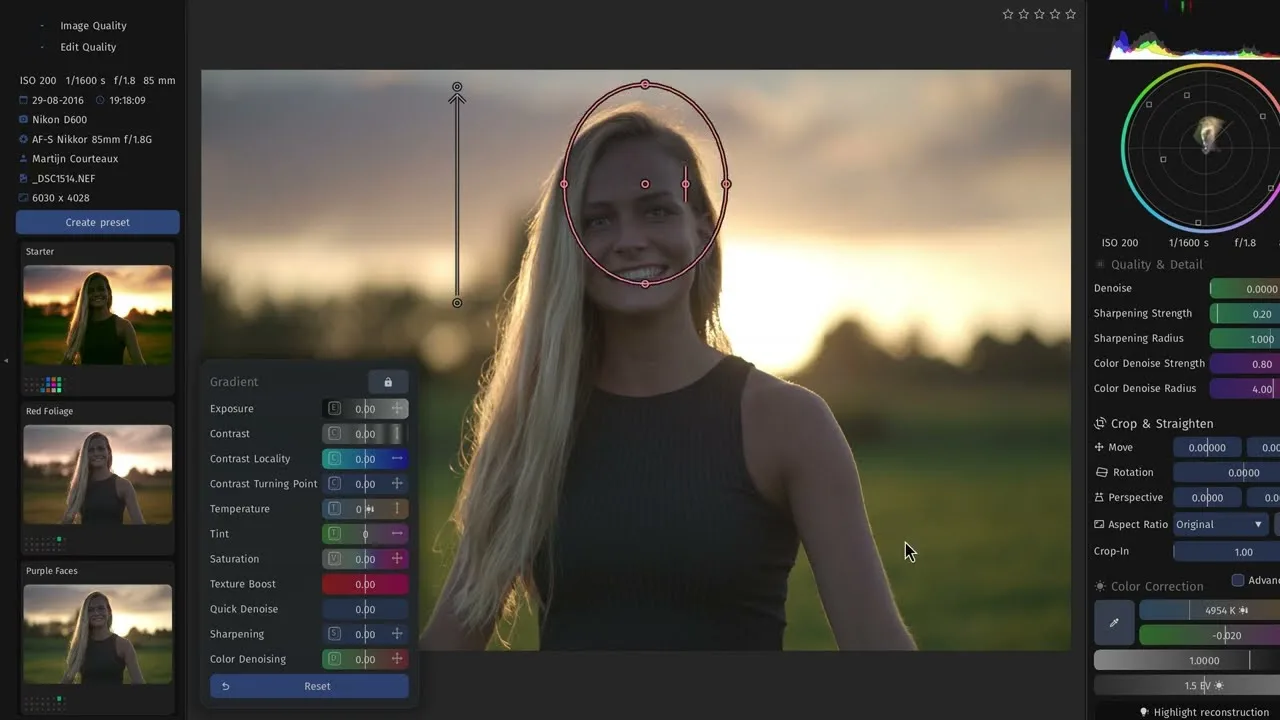
 Camera Support
 To be fully sure, download the SilverNode beta and try it before purchasing!
 Development Status
 Download
 Latest
 Windows
 Intel / AMD
  macOS
macOS Linux
Linux Vision
 Pricing
 Pay once, and own SilverNode Basic forever.
 Does not include the Pro features.
 early-bird price
 Tick the box above to accept the terms first.
 Feedback & Support
 Join Discord
 support@silvernode.io